
Automatically group photos into products
Turn messy folders into perfectly grouped products before you publish, even when you upload 500 images at once.
No credit card required.
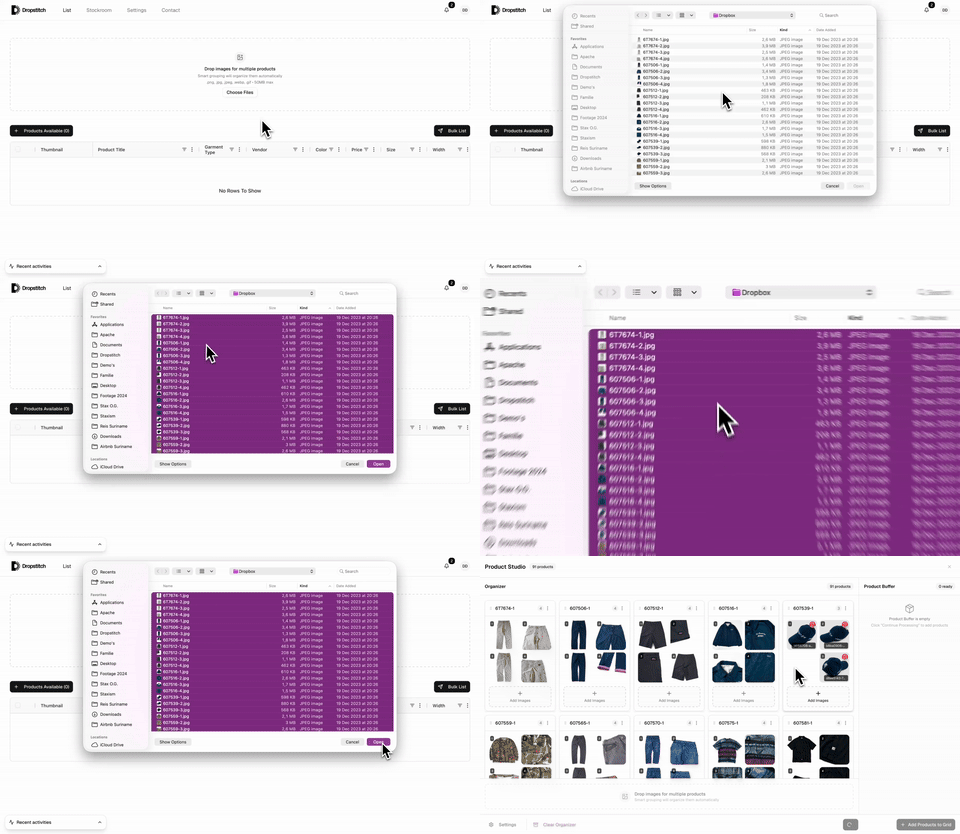
Grouping happens automatically while you upload
Dropstitch groups your shoot automatically
Uploads stay in order while Dropstitch detects which photos belong together in the background.
Prefer to start from your phone?
Dropstitch also supports faster inventory capture in the mobile app. Capture, measure, then send products into the same listing flow.

Why sellers get stuck
Image grouping workflows should not slow down an entire drop.
Sorting photos into products kills momentum.
Manual grouping leads to mistakes in each drop.
Switching between folders breaks the listing flow.
How it works
Steps to move faster
Drag in every image at once (up to 500 per batch) without naming anything.
Images are clustered into products automatically.
Move or merge photos before approving.
Lock groupings in and move straight to listing.
What makes Dropstitch different
Reasons sellers switch
- Handles messy folders with ease
- No naming conventions required
- Scales to huge batches and team workflows
Who this is for
Built for growing sellers
- Batch shooters
- Teams preparing weekly drops
- Sellers who manage large photo sets
Ready to try Dropstitch?
Take photos. Dropstitch builds the listings. Publish and crosslist everywhere.
No credit card required.